The AI notebook for analyzing video, PDF, and web pages, as well as keeping your thoughts
Add a link to a video, a PDF, or a web page, with more formats on the way. Cruxly breaks down every source, keeps them all in one chat, and answers from the actual content, not generic knowledge. Your own thoughts live here too: save them in one click, and your second brain finds the connections on its own.
What Cruxly is made of
AI Notebook
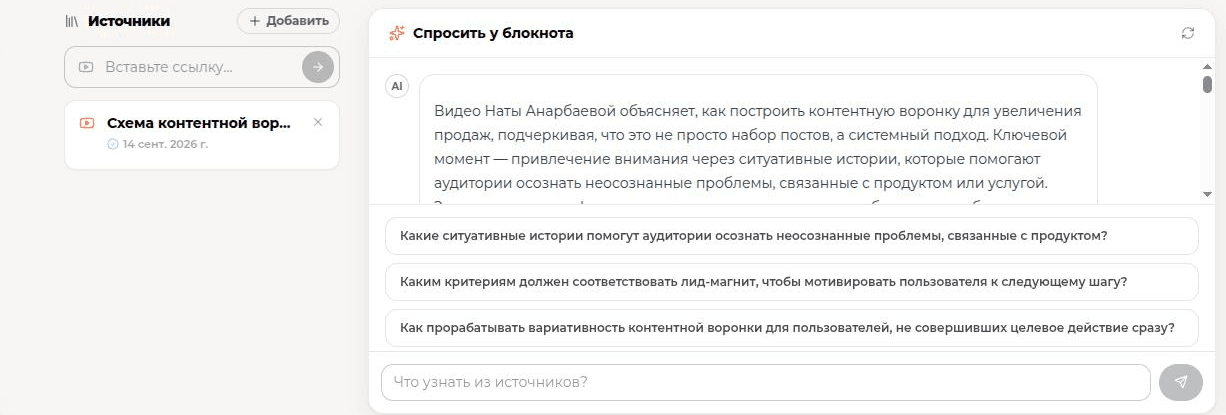
Video, PDF, web pages, and whatever format comes next, all in one notebook. Get a breakdown, then open the chat to dig into details or combine several sources.
Second Brain
Save the thoughts that matter in one click: Cruxly finds the connections between them, groups them by theme, and brings them back when they're relevant again.
Explore Second BrainChrome extension
Works right on the page: get a one-click summary of a single video, PDF, or site, no copying a link needed. Combining several sources happens in the notebook on the site.
Add to ChromeCommon pain
«A two-hour lecture, a stack of articles, a dozen open tabs, and you retain maybe 20%»
Cruxly breaks down any source and hands you the essence in your notebook
«Good ideas flash by in chats, notes, and conversations, then vanish»
Your second brain saves them in one click and finds the connections on its own
«Read → understood → forgot a week later»
Ask your notebook anything: it remembers everything, so you never re-read
Three steps from link to conversation
Add a source to your notebook
A video link, a PDF, or a web page, and that's not all. Add more than one if you need to.
Get an instant breakdown
AI pulls out the essence, key points, and structure right in the notebook.
Keep the conversation going
Ask anything about your sources: the notebook answers from their actual content and remembers the whole conversation.
Inside your notebook
These live together in one notebook: add a source once and work with everything at the same time.
AI YouTube Video Analysis: a transcript and key ideas from any YouTube video in a couple of minutes
AI PDF Document Analysis: a summary and structure for a document of any length, from an article to a book
Chat with PDF Using AI: ask anything about your sources, answered from the actual content, not generic knowledge
AI Website Page Analysis: a TL;DR, key points, and an action plan for any webpage
Standalone tools
These work on their own, outside the notebook. Each has its own way of being used.
Your AI Second Brain: a separate place for the thoughts that matter to you, connected by meaning
Cruxly Chrome Extension: analyze a YouTube video or PDF right on the page, no need to open the site
Standalone analyzers: analyze a single video, PDF, or page without a notebook — fast, free account required
Frequently Asked Questions
Build a notebook. Cruxly remembers the rest.
Add a video, PDF, or web page to a notebook, get a breakdown in minutes, and keep asking questions whenever you like. The notebook remembers it all.